By the Artixium technical team · Updated 14 October 2026
LED screen contrast is the difference between the brightest white and the darkest black a display can show. It is the specification that has the greatest effect on perceived image quality, more than brightness: a screen with deep blacks looks sharper, richer and often brighter than a more powerful screen whose blacks turn grey. This guide explains what contrast really measures, why ambient light changes everything, how to read contrast ratios on a datasheet, and how to choose a large LED display with the right contrast for your venue.
What is LED screen contrast?
Contrast is expressed as a ratio: the luminance of full white divided by the luminance of black. A screen showing 1,000 cd/m² (nits) on white and 0.2 cd/m² on black has a contrast ratio of 5,000:1.
The greater the gap between the two, the more depth, detail and realism the image has. A display with deep blacks and bright highlights always looks more natural than one where blacks appear grey, whatever its maximum brightness.
Why does ambient light change everything?
Contrast does not depend on the screen alone. Take a projector: when it displays black, it projects no light at all. The black you see is the white projection screen lit by the room. Switch the lights on and that black becomes lighter. The projector’s white has not changed, but the contrast ratio collapses.
Exactly the same principle applies to LED displays. Daylight, sunlight or stage lighting is reflected by the screen surface and adds to the black level. The contrast you actually see, called ambient contrast, follows a simple formula: (white luminance + reflected light) ÷ (black luminance + reflected light).
With the earlier example, a screen at 1,000 nits and 0.2 nits on black offers 5,000:1 in a dark room. If the room reflects 20 nits off its surface, the ratio becomes 1,020 ÷ 20.2, or about 50:1. Same screen, a hundred times less contrast.
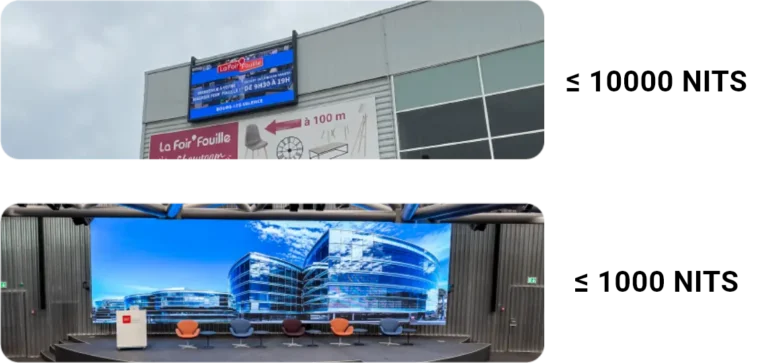
This is why outdoor screens need very high brightness, but brightness alone is not enough. Outdoor digital LED billboards and façade displays such as Thorite 3 or Cobalt also depend on careful optical design, so that sunlight does not wash out the blacks.
Why can’t datasheet contrast ratios be compared?
Unlike brightness, there is no single method for quoting contrast ratio that the whole display industry follows. One manufacturer may measure contrast:
- in a completely dark laboratory;
- with the screen switched off for the black reading;
- on a very small measurement area;
- with dynamic brightness control active;
- on the LED package alone rather than the complete display.
Another measures the complete, installed screen under realistic operating conditions. Both can legitimately publish very different numbers. A figure of 9,000:1, 20,000:1 or higher tells you almost nothing unless you also know:
- how it was measured;
- under what ambient lighting;
- whether it is static or dynamic contrast;
- whether it applies to the finished display or to a single component.
Without these answers, comparing contrast ratios between manufacturers is close to meaningless. The most reliable test is still to see the screens side by side, in light conditions close to your own.
A reference does exist, though: the IDMS (Information Display Measurements Standard), published by the ICDM and the Society for Information Display. Version 1.3, released on 31 May 2025, describes about 140 display measurement methods, contrast included. It sets no thresholds, but it lets you compare screens measured the same way: ask whether the published figures follow it.
Should you prioritise brightness or contrast?
The human visual system does not judge image quality on brightness alone. It responds mainly to local contrast, the difference between neighbouring areas of the image. A 1,000-nit screen with excellent contrast can therefore look brighter and more vivid than a 10,000-nit screen with poor contrast.
Raising brightness lifts the white level. Improving contrast lowers the black level, and lowering the black level often brings the bigger visual gain. That is why high-end cameras, televisions and cinema screens put so much engineering into their blacks. Indoors, a screen driven too bright also looks harsh and tiring: correct LED screen calibration sets brightness to suit the venue rather than to the maximum on the datasheet.
How do manufacturers improve LED screen contrast?
Contrast is engineered into the screen surface, from the LED package to the module. The main levers are:
- Black LED packages. Black face and full black face SMD LEDs darken the visible surface of each pixel. Our guide Black face vs full black face compares the two.
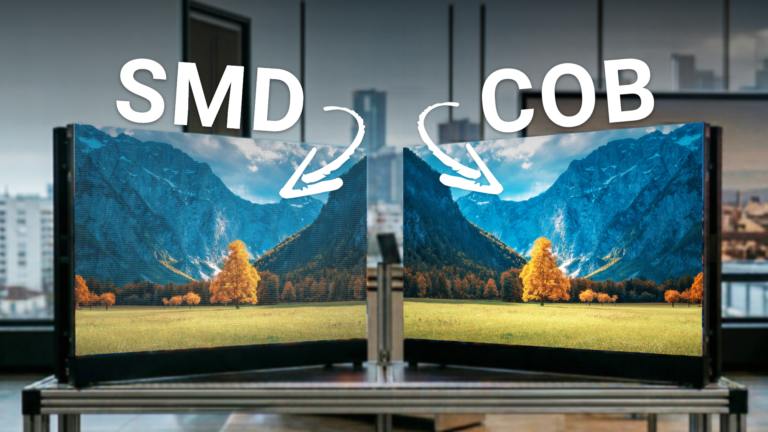
- COB encapsulation. In COB (chip-on-board), the chips are mounted on the board and covered with a uniform dark coating, which gives a deeper, more even black. See What is COB technology? and our Titanite 3 display.
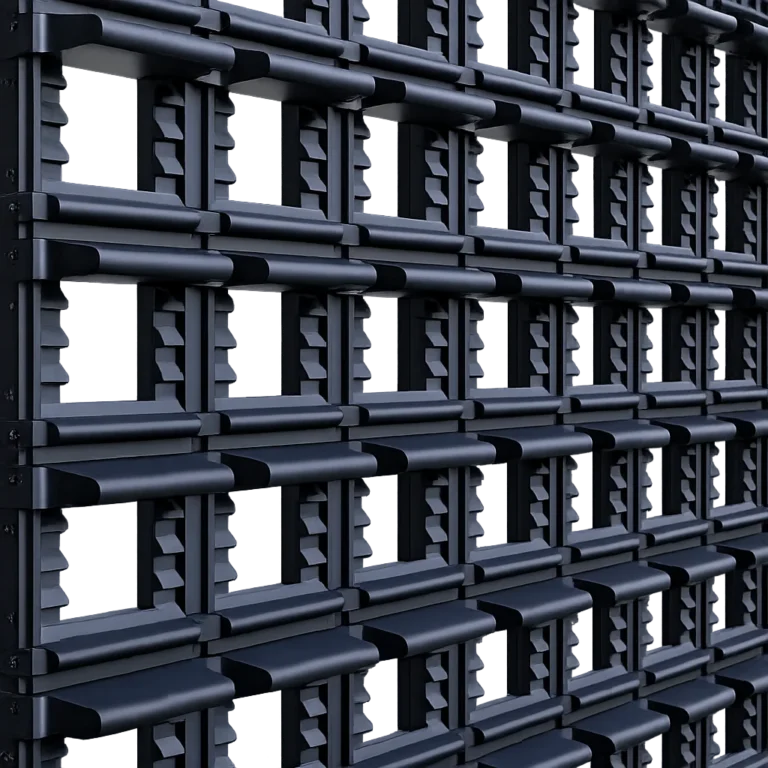
- Masks and louvres. On outdoor modules, small shades above each row of pixels trap light arriving from above, especially sunlight, before it reaches the surface.
- Matte surface treatments that reduce reflections instead of mirroring the room.
Why does contrast drop at fine pixel pitch?
As pixel pitch shrinks, high contrast becomes harder to achieve. Smaller pixels leave less black area between the LEDs, so the natural dark surface of the screen shrinks. Designers also have less physical space for louvres and other optical treatments that suppress unwanted reflections. The result is often lower effective contrast, especially outdoors, where sunlight reflections dominate.
Designing a fine pitch outdoor display, such as Silicium (P1.9 – P2.9), is therefore a balance between five factors:
- pixel density;
- brightness;
- optical efficiency;
- contrast;
- mechanical design.
Optimising one often compromises another. This is why the right pixel pitch is the one that matches your viewing distance, not the smallest one on offer.
How do you choose an LED screen for contrast?
Match the contrast strategy to the environment where the screen will live:
- Control rooms and broadcast studios. Controlled lighting, viewers close to the screen: black level and uniformity come first. COB and ultra fine pitch displays such as Cadmium suit control room LED video walls and broadcast studios.
- Shops and window displays. Daylight hits the screen through the glass: you need enough brightness and a dark, low-reflection surface. See our retail LED displays.
- Outdoor advertising and façades. Direct sunlight: very high brightness plus masks and an optical design built for the sun.
- Stadiums. Screens viewed from far away, often in full daylight, such as the Neipatec ST perimeter LED system or Cobalt Fascia on our stadium LED displays page.
- Events. Stage lighting reflects on the screen: favour black LEDs and a low-reflection surface, and check the image under your own lighting rig. See our rental and event LED screens, such as Beryl.
Contrast is not the only criterion: also check the refresh rate for cameras and the IP rating for outdoor use. The best way to judge contrast is to see it: compare our screens in our showroom or tell our team about your project.
Frequently asked questions about LED screen contrast
What is a good contrast ratio for an LED screen?
There is no universal figure, because manufacturers do not measure contrast the same way. A ratio is only meaningful if you know the measurement conditions: ambient light, static or dynamic contrast, complete screen or single component. The most reliable comparison is to view the screens side by side in light conditions close to yours.
Should I choose brightness or contrast?
Contrast has the greater effect on perceived image quality. Brightness must be high enough for the environment, especially outdoors, but beyond that, a lower black level improves the image more than extra nits.
Why does my LED screen look grey in daylight?
Ambient light is reflected by the screen surface and adds to the black level. Black looks grey and effective contrast drops sharply. Black LEDs, masks and a matte surface reduce this effect.
What is dynamic contrast?
Dynamic contrast is measured while the screen adjusts its brightness to the content, for example by dimming or switching off for the black reading. It produces very high figures that do not reflect what you see when white and black are on screen at the same time.
Does COB technology improve contrast?
Yes. In COB displays the chips are covered with a uniform dark coating, which deepens the black surface of the screen and reduces reflections, especially at fine pixel pitches.
What sources is this guide based on?
This guide draws on the article by Clifford Rickman, an LED display and lighting engineer specialising in PCB, thermal and structural design: Why Contrast Matters More Than Brightness, published on LinkedIn in June 2026. His conclusion sums up the topic well: brightness sells on a datasheet, contrast sells when you see the screen. Our thanks to him. To go further, read his story of the pioneers in our history of LED guide.
- Clifford Rickman, Why Contrast Matters More Than Brightness, LinkedIn, 26 June 2026.
- ICDM / Society for Information Display, Information Display Measurements Standard (IDMS) v1.3, 31 May 2025.